Pain point 01
Manual work survives the integration
Even after buying software, teams still maintain mappings in spreadsheets, fix cost code mismatches by hand, and verify whether jobs, bills, invoices, and payments landed correctly.
We keep jobs, cost codes, bills, invoices, and payments aligned between your PM and accounting systems — with validation, exception handling, and an audit trail that shows where transfers are complete, blocked, missing, or unclear.
GlueApp works across common contractor stacks, including Procore and QuickBooks as key examples, but also Autodesk Construction Cloud, Oracle Primavera P6, Oracle Construction Cloud, Buildertrend, RedTeam, Sage 100 Contractor, Fieldwire, PlanGrid or Autodesk Build, Raken, NetSuite, Sage Intacct, Sage 300, and similar combinations. Its audit layer can sit on top of GlueApp transfers as well as transfers handled by existing connector or intermediary apps, so your team can identify the gaps those tools leave behind without forcing your workflow into a generic connector.
That is the core gap GlueApp closes. Generic connectors move some records, but many contractors still spend hours checking mappings, chasing missing syncs, correcting edge cases, and proving what changed before month-end.
Even after buying software, teams still maintain mappings in spreadsheets, fix cost code mismatches by hand, and verify whether jobs, bills, invoices, and payments landed correctly.
Most integrations are good at moving supported data, but weak at showing what is missing, ambiguous, duplicated, blocked, or out of scope for your specific workflow.
When something breaks, the team often ends up bouncing between the PM system, the accounting system, and the connector vendor without one trustworthy audit trail.
GlueApp is a strong fit for controllers, finance leads, operations leaders, and project managers at firms using GC-focused project tools and standard accounting systems, especially when Procore and QuickBooks are important examples in the stack.
Keep authority over what gets posted, validated, and approved without becoming the human middleware between systems.
See whether a job is actually sync-ready, what is blocked, and what needs attention before accounting discovers it later.
Standardize reconciliation logic across jobs, entities, and teams while keeping the flexibility to match your current apps and process.
Instead of replacing your PM system or your accounting platform, GlueApp makes your mappings explicit, validates records before they move, surfaces exceptions in one queue, and keeps an audit-ready history of every decision.
GlueApp checks jobs, cost codes, vendors, bills, invoices, and payments before anything is pushed, so teams catch issues upstream instead of after a sync fails.
Missing mappings, ambiguous matches, blocked records, and workflow-specific rules all appear in a clean queue that explains what happened and what should happen next.
Whether your team uses Procore and QuickBooks or a different combination such as Autodesk Construction Cloud and NetSuite, GlueApp can be configured around your current apps, entity structure, approvals, and object rules.
GlueApp gives construction finance and operations teams a clear workspace for mapped projects, transfer readiness, exceptions, approvals, and timeline evidence. The interface is built to show what moved, what stopped, and why.
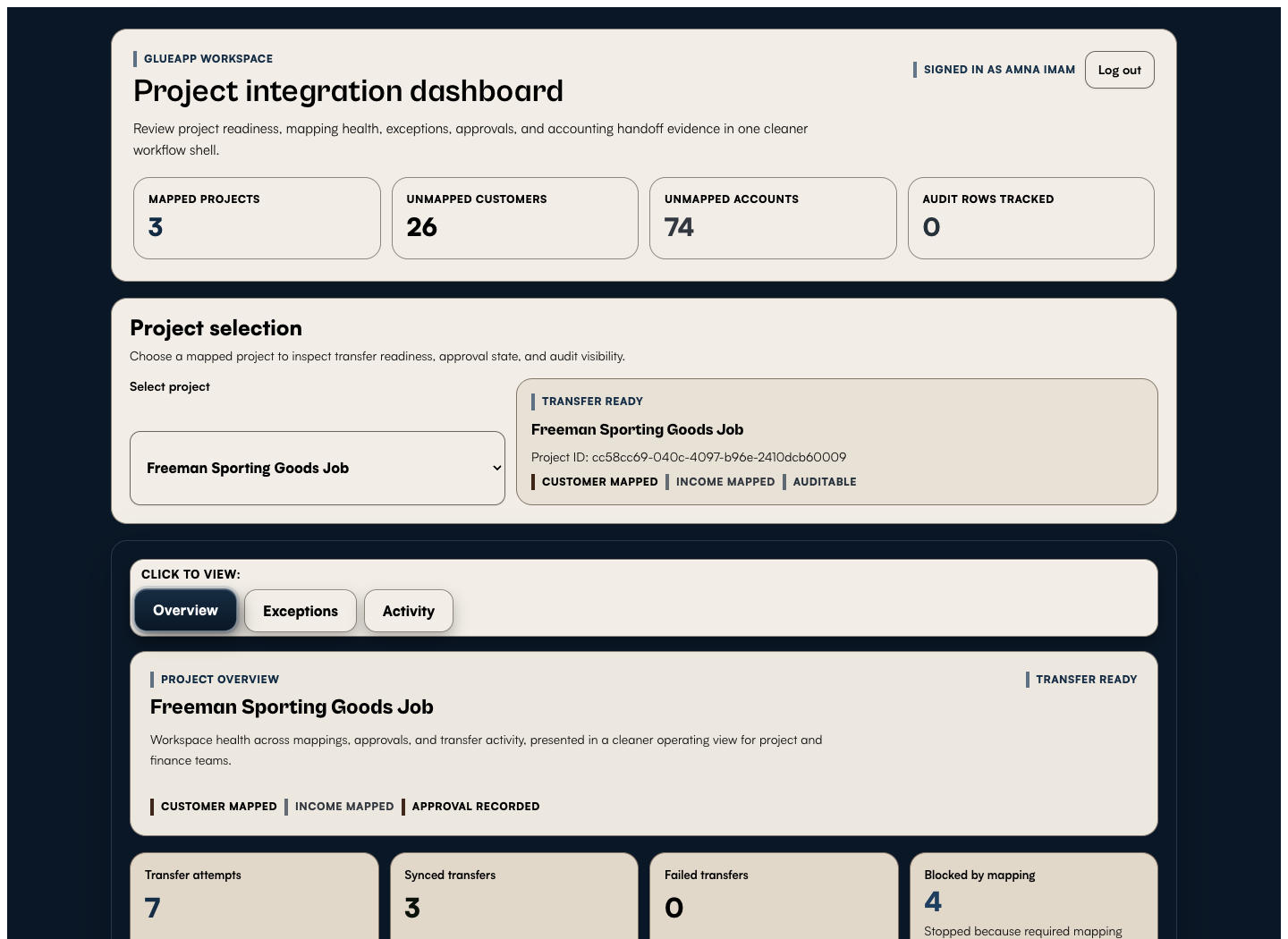
A quick view of mapped project health, missing setup, and transfer readiness in one operating dashboard.
A short walkthrough of sign-in, Overview, Exceptions, and Activity so buyers can see the workflow before a live demo.
GlueApp is intentionally narrow. It adds clarity before data moves, during review, and after posting, so every team can see whether the issue is setup, logic, approval, or transfer history.
Start with the project and accounting apps you already use, then configure mappings, field rules, and entity logic around your specific process.
Check jobs, cost codes, vendors, bills, invoices, and payments before they move, with clear status by record and by project.
Use the exception queue to fix missing mappings, mismatched objects, blocked syncs, or approval-required items without hunting through multiple systems.
Review who changed what, when it changed, why it was approved, and how the final posted state was reached.
We will walk through a live use case, show how validation and exceptions work, and map the demo to the specific PM and accounting apps your team already uses.